
Using LeadsLeap to Promote Any Offer

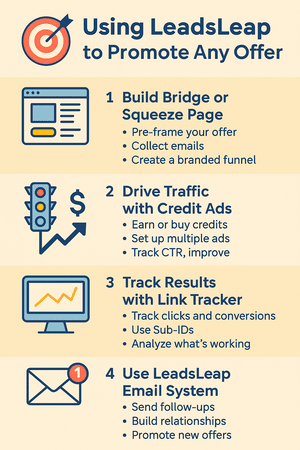
Infographic titled “Using LeadsLeap to Promote Any Offer” showing four steps: create a page, drive traffic, track performance, and follow up via email.

🎯 Using LeadsLeap to Promote Any Offer (Not Just LeadsLeap)

One of the biggest misconceptions about LeadsLeap is that it’s “just for promoting LeadsLeap.” Not true.

LeadsLeap is actually a full-blown marketing ecosystem that you can use to promote:

  • ✅ WarriorPlus or ClickBank products
  • ✅ Your blog or free lead magnet
  • ✅ A PLR funnel or opt-in offer
  • ✅ Any affiliate program or service you believe in

Let’s walk through exactly how to use LeadsLeap to promote any offer you want — even if you’re brand new.


🧱 Step 1: Create a Bridge Page or Squeeze Page

You never want to send raw affiliate traffic directly to your offer — it’s a missed opportunity.

Instead, build a quick bridge page or opt-in page using the LeadsLeap Page Builder. This helps you:

  • 📬 Collect emails before sending visitors to the offer
  • 🧠 Pre-frame your pitch or offer value
  • 🛠️ Create a branded, professional-looking funnel

🚦 Step 2: Drive Traffic with LeadsLeap Credit Ads

Use the Credit Ad system to send real traffic to your bridge page. As a free member, you can:

  • ✅ Earn credits by viewing ads
  • ✅ Set up multiple rotating ads
  • ✅ Track click-through rates to improve performance

Pro tip: Write benefit-driven headlines that create curiosity and lead to your opt-in.


📊 Step 3: Track Everything with LeadsLeap’s Tools

Use the Link Tracker and Sub-ID system to monitor:

  • Where your clicks are coming from
  • Which ads convert best
  • Which affiliate links get the most engagement

This is crucial when you’re promoting multiple offers and want to know what’s worth scaling.


📬 Step 4: Follow Up with LeadsLeap’s Email System

Every time someone opts into your bridge page, they’re added to your LeadsLeap List Manager. From there, you can:

  • ✅ Send automated follow-up emails
  • ✅ Broadcast new offers or value-driven content
  • ✅ Build a relationship that leads to long-term commissions

Even better — it’s all free, and you don’t need another autoresponder to get started.


📌 Examples of Offers You Can Promote

  • 🔥 A WarriorPlus product with a bonus page built in LeadsLeap
  • 📥 A PLR giveaway funnel you control
  • 📚 A free guide opt-in from your blog
  • 🎓 A course or training you’re an affiliate for

If you can build a page for it, you can use LeadsLeap to send traffic to it — and monetize it.


✅ Final Thoughts

LeadsLeap isn’t just a place to promote LeadsLeap. It’s your free marketing command center.

Whether you’re running a funnel, testing affiliate links, building your list, or trying out new traffic sources — LeadsLeap gives you the tools, tracking, and traffic to get it done.

👉 Join here and start promoting whatever you want — with tools that actually work.


Want step-by-step help building your own online business? Check out my favorite platform below.

30-Day Beginners Roadmap

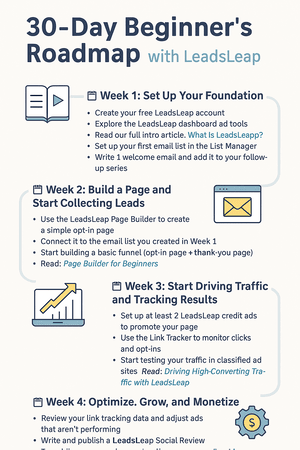
Infographic titled “30-Day Beginner’s Roadmap with LeadsLeap” with four weekly sections guiding users through setup, traffic, tracking, and monetization.

🗺️ 30-Day Beginner’s Roadmap to LeadsLeap Success

If you’re new to LeadsLeap (or affiliate marketing in general), the hardest part is knowing where to start. This 30-day beginner’s roadmap will help you take focused, actionable steps — so you don’t get overwhelmed.

Follow this guide week by week, and by the end of 30 days, you’ll have your first traffic funnel running, your list growing, and your affiliate offers converting.


📅 Week 1: Set Up Your Foundation

  • Create your free LeadsLeap account 👉 Join here
  • ✅ Explore the LeadsLeap dashboard and tools
  • ✅ Read our full intro article: What Is LeadsLeap?
  • ✅ Set up your first email list in the List Manager
  • ✅ Write 1 welcome email and add it to your follow-up series

🎯 Your goal for Week 1: Understand the tools and get your list builder set up.


📅 Week 2: Build a Page and Start Collecting Leads

  • ✅ Use the LeadsLeap Page Builder to create a simple opt-in page
  • ✅ Connect it to the email list you created in Week 1
  • ✅ Start building a basic funnel (opt-in page + thank-you page)
  • ✅ Read: Page Builder for Beginners

🎯 Your goal for Week 2: Launch a live, mobile-friendly opt-in page.


📅 Week 3: Start Driving Traffic and Tracking Results

🎯 Your goal for Week 3: Get your first 50–100 real clicks and track your results.


📅 Week 4: Optimize, Grow, and Monetize

  • ✅ Review your link tracking data and adjust ads that aren’t performing
  • ✅ Write and publish a LeadsLeap Social Review
  • ✅ Try adding a pop-up to your landing page using Pop Manager
  • ✅ Read:
  • ✅ Begin building your second opt-in or bridge page to promote a WarriorPlus or affiliate offer

🎯 Your goal for Week 4: Improve your funnel, grow trust, and set up multiple offers.


✅ Final Tips to Keep Going

  • 🧠 Stay consistent — traffic builds over time
  • 📊 Track everything using Sub-ID and Click Tracker
  • ✍️ Write 1–2 more Social Reviews each month
  • 📈 Upgrade to Pro when you’re ready to scale

With just 20–30 minutes a day, you can build a real business — starting now.

👉 Join LeadsLeap for free and start your 30-day journey here


Want step-by-step help building your own online business? Check out my favorite platform below.
Using Social Reviews for Authority

Infographic titled “Using LeadsLeap Social Reviews” showing steps to create, write, and share reviews to build authority and drive affiliate traffic.

🌟 Using LeadsLeap Social Reviews to Build Authority and Trust

Want to stand out in a sea of affiliate links? Try something most marketers ignore — LeadsLeap Social Reviews.

This built-in tool helps you create public reviews of tools, services, and opportunities you’re using. In return, you gain:

  • ✅ More exposure
  • ✅ Increased trust
  • ✅ Organic traffic and LeadsLeap referrals

Here’s how to use this hidden gem to build your brand and bring in passive leads over time.


🔍 What Are LeadsLeap Social Reviews?

LeadsLeap allows members to post honest reviews of any program or service (especially ones you’re promoting). These reviews are visible:

  • 📌 On LeadsLeap’s internal review directory
  • 📢 Through search engine traffic (they rank!)
  • 🔗 Via your own links and blog embeds

Each review includes your referral link — so if someone signs up, you get the credit.


🎯 Why Social Reviews Work So Well

People trust other people more than they trust ads. That’s why reviews carry weight.

When you write a helpful, real review (not hype), you position yourself as:

  • 🧠 Someone with firsthand experience
  • 🤝 A trustworthy source of info
  • 🌱 A real user, not just a pitch machine

And LeadsLeap rewards you for it — with rankings, visibility, and potential affiliate signups.


✏️ How to Write a Good Review

Here’s a simple formula for writing social reviews that work:

  1. Introduce the product or service — what it is and who it’s for
  2. Share your personal experience — how you’ve used it and what happened
  3. List 2–3 pros (and maybe a con — be real)
  4. Include a call to action with your referral link

Pro tip: Write like you’re talking to a friend who asked, “Is this any good?”


🔗 Where to Use Your Reviews

Once your review is live, put it to work:

  • 📄 Link to it from your blog or “tools I use” page
  • 📧 Share it in your email autoresponder
  • 🗣️ Mention it in your YouTube, TikTok, or podcast content
  • 💬 Share it on forums or in relevant Facebook groups (tactfully!)

The more places you use it, the more visibility (and trust) you build.


✅ Great Review Topics to Start With

  • LeadsLeap itself
  • WarriorPlus tools you actually use
  • PLR sellers you recommend
  • Ad or traffic platforms (like your own Choice4ProfitAds)
  • Training courses, autoresponders, or domain hosts

Basically, if you use it and believe in it — review it.


💬 Final Thoughts

Social reviews help you stand out, provide value, and build long-term authority — all while earning passive traffic and affiliate income.

Write from experience. Be honest. Help others make better decisions.

That’s how you turn a review into a relationship — and a click into a customer.

👉 Join LeadsLeap and publish your first review today


Want step-by-step help building your own online business? Check out my favorite platform below.

Hidden Features Breakdown

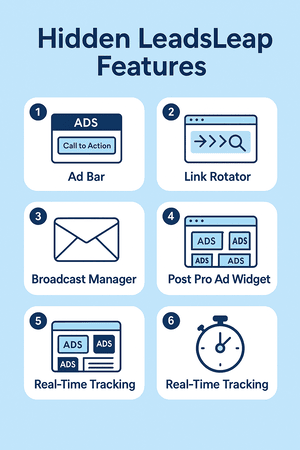
Infographic highlighting six hidden LeadsLeap features including Ad Bar, Link Rotator, Sub-ID tracking, Broadcast Manager, Post Pro Widget, and Real-Time Stats.

🕵️‍♂️ Hidden LeadsLeap Features That Most Users Miss

LeadsLeap is loaded with tools — but many users only scratch the surface.

In this guide, we’re going to pull back the curtain and show you the advanced (and often overlooked) features that can help you drive more traffic, track your links better, and run a smarter business — even if you’re using a free account.


📌 1. The Ad Bar

The Ad Bar lets you add a branded banner to any link you track. When someone clicks your LeadsLeap tracking link, they’ll see a small, non-intrusive banner at the top or bottom of the page with your message and a call to action.

Use it to promote:

  • 💬 A link to your lead magnet
  • 🛒 A second offer related to the main one
  • 📢 A custom CTA (“Need help? Join my list!”)

Enable it under the Link Manager > Ad Bar tab.


This tool allows you to rotate multiple URLs through one single tracking link. Great for split-testing offers or rotating traffic between multiple landing pages.

Perfect if you want to test:

  • Two different versions of a squeeze page
  • Different bridge pages for the same affiliate offer
  • Bonus delivery pages or redirect sequences

Use this when promoting in classified ads, solo ads, or anywhere you expect consistent clicks.


📊 3. Sub-ID Tracking

This feature is buried deep but incredibly powerful. You can append a ?r=source to the end of any LeadsLeap link to track exactly where your clicks are coming from.

Example: https://leadsleap.com/?r=fivecharlie&subid=classified1

This helps you track which platforms (safelists, email blasts, YouTube links, etc.) are actually converting.


📬 4. Broadcast Manager (Free Email Blasts)

LeadsLeap includes an autoresponder and broadcast tool you can use to send emails to your list — without monthly fees.

Inside List Manager you can:

  • Create email sequences (follow-ups)
  • Send broadcast emails manually
  • View open/click stats per message

Perfect for promoting affiliate products, blog posts, or your WA review funnel.


📲 5. Post Pro Ad Widget (Bonus Feature)

If you run a blog or WordPress site, you can embed your LeadsLeap ads and monetize your content directly.

This feature allows you to display rotating ads from the LeadsLeap network — and earn ad views and commissions passively.

Find it under Money > PPC Widget.


⏱️ 6. Real-Time Click Tracking Dashboard

Click “Stats” inside the Link Manager and you’ll see detailed real-time analytics:

  • Time of click
  • Device used
  • Location (country, browser, etc.)

This helps you analyze your campaigns in depth — which is almost unheard of in free tools.


✅ Final Thoughts

Most people use LeadsLeap just for traffic. But the hidden tools inside it are what truly make it powerful.

With just a little effort, you can start using:

  • 🔗 Link rotators
  • 🧭 Real tracking with sub-IDs
  • 📬 Email marketing & autoresponders
  • 🧱 Page building + popups

It’s not about using everything — it’s about using the right tools for your goals.

👉 Explore the full LeadsLeap toolbox here and give yourself an edge.


Want step-by-step help building your own online business? Check out my favorite platform below.

Popup Creator Guide

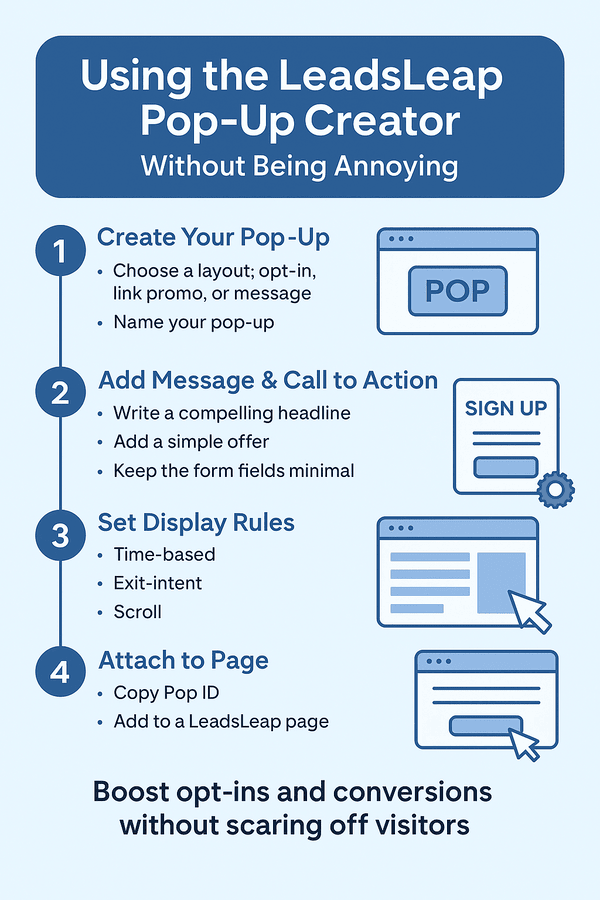
Infographic titled “Using the LeadsLeap Pop-Up Creator” with four visual steps covering setup, message writing, display settings, and page integration.

💡 LeadsLeap Pop-Up Creator Guide: Boost Conversions Without Being Annoying

Let’s be honest — most popups suck. They interrupt the visitor, load too late, or feel like spam.

But if used correctly, popups can be one of the highest-converting tools in your marketing toolbox — especially if you’re using LeadsLeap’s Pop Manager.

In this guide, you’ll learn how to use popups the right way — with less push, more pull, and smarter timing.


🔍 What Is the LeadsLeap Pop Manager?

LeadsLeap’s Pop Manager lets you create simple but powerful popups that can:

  • ✅ Collect email addresses
  • ✅ Promote affiliate links or offers
  • ✅ Direct users to your landing pages

You can set them to trigger based on time, user exit intent, or scroll behavior. And yes — it works even if you’re using the free version of LeadsLeap.


🧱 Step 1: Create Your Popup

  1. Log in to LeadsLeap
  2. Go to Pop Manager
  3. Click “Add New Pop”

Choose your layout style (opt-in, link promo, or message-only) and give it a name.


✏️ Step 2: Add Your Message & Call to Action

Edit the popup content just like you would a mini landing page. Include:

  • A quick, compelling headline (value-focused)
  • A short message or benefit
  • A button or form — keep it simple

💡 Example: “Want 100 Free Ad Credits? Grab This Guide Instantly.”


🎯 Step 3: Set Your Display Rules

This is where you choose when and how the popup appears:

  • 🕒 Time-based (e.g., show after 10 seconds)
  • 📤 Exit intent (trigger when they’re about to leave)
  • 📜 Scroll percentage (show after 50% scroll)

You can also limit how often it shows per user (once per session, once per day, etc.). This is key for not annoying your visitors.


🚀 Step 4: Attach to Any LeadsLeap Page

Once you’ve built your popup, just grab the Pop ID and attach it to any page inside your Page Manager.

  1. Edit the page
  2. Find the “Use a Pop” option in settings
  3. Select your popup from the dropdown

That’s it — your popup is live and working automatically.


✅ Best Practices for Non-Annoying Popups

  • 📌 Only use popups on focused pages (like a blog post or thank-you page)
  • 📩 Offer something valuable — not just “Sign Up Now”
  • 🧠 Use scroll-based or exit-intent triggers to avoid disruption
  • 📱 Check mobile view — popups should be easy to close

Used wisely, popups don’t have to be annoying — they can be a smooth next step in your funnel.


💬 Final Thoughts

Popups still work — when they’re used right. And LeadsLeap gives you a free, flexible way to add them to your marketing funnel without code or complexity.

Use popups with intention, offer something valuable, and let them gently guide your visitors where you want them to go.

👉 Try the LeadsLeap Pop Manager here and test your first popup today.


Want step-by-step help building your own online business? Check out my favorite platform below.
Page Builder for Beginners

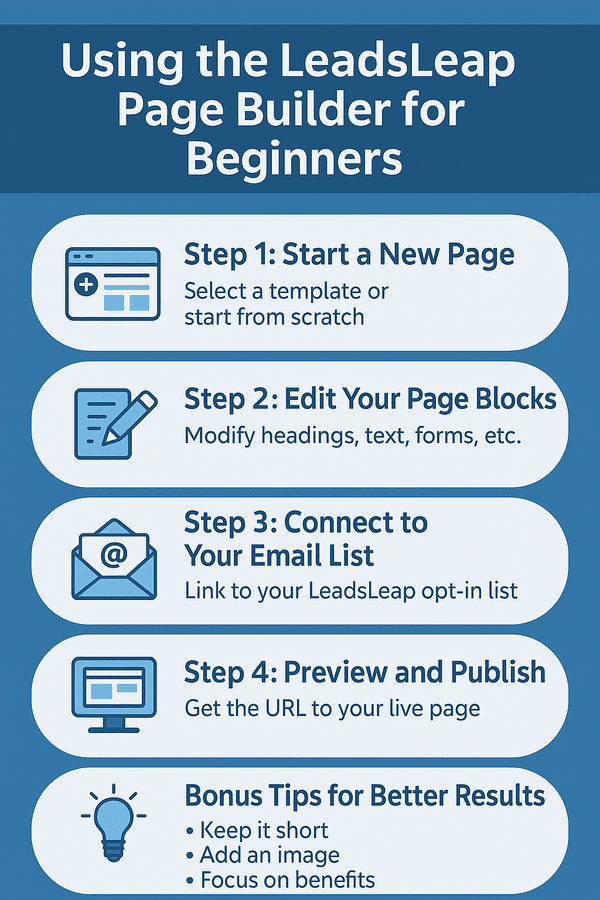
Infographic titled “Using the LeadsLeap Page Builder for Beginners” with five steps including page creation, editing, list connection, publishing, and optimization tips.

📄 LeadsLeap Page Builder for Beginners: Simple Setup, Big Results

If you’ve ever said “I’m not techy enough to build a page,” you’re not alone.

The LeadsLeap Page Builder is made for people just like you — beginners who want to create landing pages, bridge pages, or even full mini-sites without code, expensive tools, or confusion.

Here’s how to use it — step-by-step — even if you’ve never built a page before.


💡 Why Use the LeadsLeap Page Builder?

There are lots of page builders out there, but LeadsLeap stands out because:

  • ✅ It’s 100% free (even the good stuff)
  • ✅ No need for external hosting or plugins
  • ✅ Easy drag-and-drop system — no coding
  • ✅ Works great for affiliate marketers

You can build opt-in pages, thank-you pages, bridge pages, or even bonus delivery pages — all in the same system you’re using for traffic and tracking.


🧱 Step 1: Start a New Page

Once you’re logged into LeadsLeap, go to:

  1. Tools > Page Manager
  2. Click “Add a New Page”
  3. Select a template or start from scratch (use a template to make life easier)

Tip: Don’t worry about making it perfect — your goal is to publish something usable, not win design awards.


✏️ Step 2: Edit Your Page Blocks

You’ll see sections like:

  • Headline – Write something attention-grabbing with a benefit
  • Subheadline – Clarify the offer (e.g. “Free Guide Reveals…”)
  • Opt-in Form – Collect names/emails directly into LeadsLeap
  • Image or video block – Optional, but great for engagement

Click on each block to edit text, fonts, and layout. It autosaves as you go.


📬 Step 3: Connect to Your Email List

If you’re using LeadsLeap’s built-in email system:

  1. Go to List Manager
  2. Create a new list and copy the form ID
  3. Paste it into your page’s opt-in settings

This connects your page to your follow-up emails. No third-party service required!


🚀 Step 4: Preview and Publish

Click “Preview” to check how your page looks on desktop and mobile.

When you’re happy, click “Get Page URL” — this is the live link you’ll promote on:


🔧 Bonus Tips for Better Results

  • 📌 Keep it short — one goal per page
  • 📸 Use a clear image or icon above the opt-in
  • 🎯 Focus the copy on the benefit to the reader
  • 📊 Track your results with LeadsLeap’s link tracker

Want a real-world example? Use your page to promote a free PDF, redirect to a WarriorPlus product, or build your affiliate list — all within LeadsLeap.


✅ Final Thoughts

Building a page used to require designers, developers, and monthly fees. Not anymore.

With LeadsLeap, you can create professional-looking pages — for free — even if you’ve never done it before.

It’s beginner-friendly, mobile-ready, and built with marketers in mind. Once you get the hang of it, you’ll wonder why you ever hesitated.

👉 Join LeadsLeap and build your first page today


Want step-by-step help building your own online business? Check out my favorite platform below.
Driving High-Converting Traffic

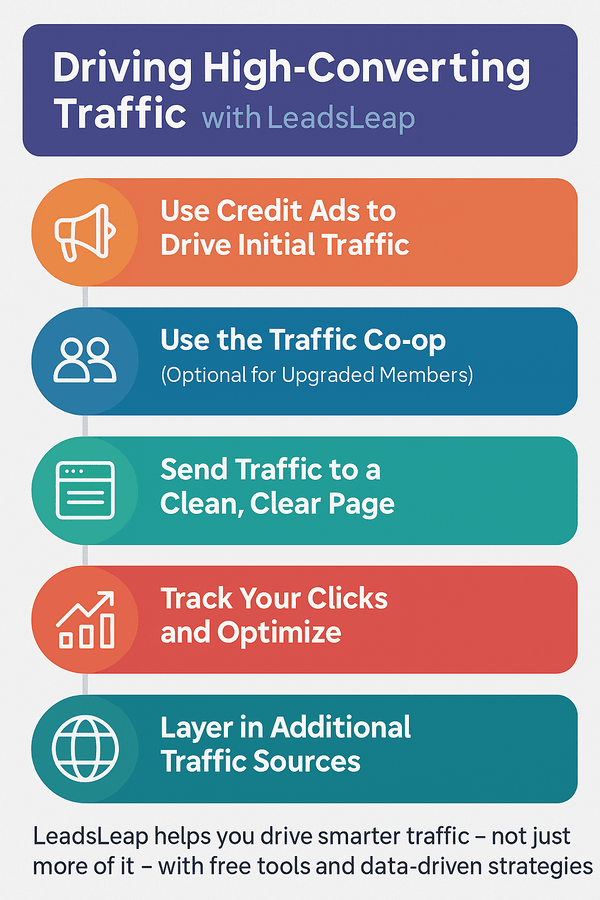
Infographic listing five steps for driving high-converting traffic using LeadsLeap, including credit ads, co-op traffic, tracking, and optimization.

🚦 Driving High-Converting Traffic with LeadsLeap

If you’ve been posting links everywhere and getting zero conversions, don’t worry — it’s not just you.

Traffic is easy to get. Quality traffic that actually converts? That takes a smarter system — and that’s exactly what LeadsLeap helps you build.

Here’s how to use it to get better traffic, more targeted clicks, and higher conversion rates — even as a free member.


📢 Step 1: Use Credit Ads to Drive Initial Traffic

LeadsLeap’s traffic exchange lets you earn credits by viewing other members’ ads. You can use those credits to promote your own:

  • Landing pages
  • Bridge pages
  • Affiliate offers

Set up multiple ads and rotate them. LeadsLeap gives you real-time stats on views, clicks, and click-through rates.

Pro tip: Lead with curiosity or value — not hype. You want real people to click, not just “ad skimmers.”


👥 Step 2: Use the Traffic Co-op (Optional for Upgraded Members)

Upgraded members can pool ads together and run them through LeadsLeap’s traffic co-op — which pulls visitors from outside platforms.

That means more fresh eyeballs, higher click rates, and better quality leads. If you’re serious about scaling, the co-op is a no-brainer upgrade.


🧱 Step 3: Send Traffic to a Clean, Clear Page

Your traffic is only as good as the page it lands on.

Use LeadsLeap’s page builder to create:

  • Clear headlines with a specific benefit
  • Simple opt-in forms — no distractions
  • One CTA per page (don’t confuse your traffic!)

Test your pages regularly. Just changing a headline can double your opt-ins.


📊 Step 4: Track Your Clicks and Optimize

With LeadsLeap’s tracker, you can see:

  • Which ads get the most clicks
  • Which pages convert best
  • Where your traffic is really coming from

Once you have data, adjust your ads and headlines accordingly. Cut what’s not working — double down on what is.


🌐 Step 5: Layer In Additional Traffic Sources

Once you’ve fine-tuned your offer using LeadsLeap traffic, start sharing your landing page across other platforms like:

LeadsLeap becomes your conversion-optimized base — and you feed traffic into it from multiple streams.


✅ Final Thoughts

You don’t need thousands of random visitors. You need 100 targeted clicks that actually care.

LeadsLeap gives you everything you need to create, track, and scale high-converting traffic — without paying for solo ads, expensive funnels, or ad agencies.

Start free. Test smart. Scale slowly. That’s the formula for traffic that converts.

👉 Join LeadsLeap here and start driving better traffic

Budget-Friendly Email List Building

Infographic illustrating 5 steps to build an email list on a tight budget using LeadsLeap’s free tools and traffic systems.

💌 Budget-Friendly Email List Building with LeadsLeap

You’ve probably heard it a thousand times: “The money is in the list.” But what if you’re starting with zero budget?

That’s where LeadsLeap comes in — a 100% free platform that gives you everything you need to build an email list without spending a dime.

Here’s how to make it happen — step by step.


🎁 Step 1: Create a Simple Lead Magnet

Before you can build a list, you need something to offer. This can be:

  • A free report or checklist (use PLR content or AI to create one)
  • Access to a free video, tool, or resource
  • “Behind the scenes” info or bonus content for affiliates

Keep it simple — the goal is to give value in exchange for an email address.


📄 Step 2: Build a Capture Page with LeadsLeap

LeadsLeap includes a drag-and-drop page builder that’s perfect for beginners.

Use it to create a clean, mobile-friendly squeeze page. Include:

  • A clear headline with the benefit
  • A short description or bullet list
  • A form that collects the visitor’s email

Pro tip: LeadsLeap even hosts your pages — no need for separate hosting or domains.


📬 Step 3: Set Up Your Email Follow-Up

LeadsLeap offers a built-in email autoresponder you can use for:

  • Automated welcome emails
  • Ongoing value-based follow-ups
  • Affiliate offers and content promotions

You don’t need a third-party tool like GetResponse or AWeber — it’s all built in.


🚀 Step 4: Get Free Traffic to Your Page

LeadsLeap also includes a free ad system and traffic exchange. Here’s how to start:

  • Use Credit Ads to get eyeballs on your squeeze page
  • Surf ads to earn credits — these convert into views for your offer
  • Upgrade when you’re ready, but start free

Want more reach? Promote your page on classified sites like:


📊 Step 5: Track, Tweak, and Improve

Use LeadsLeap’s tracker to measure:

  • Clicks per source
  • Conversion rates on your opt-in page
  • Follow-up email open/click stats

Over time, you’ll see what works — and you’ll build a list that grows even while you sleep.


✅ Why This Works

Most beginners burn out trying to build a list because they’re told they need:

  • Expensive autoresponders
  • Monthly funnel tools
  • Paid ads or complicated platforms

LeadsLeap removes all of that. It’s simple, free, and effective. And it works because it lets you focus on building your audience, not your overhead.


💡 Final Thoughts

You don’t need a big budget to start growing your list.

With LeadsLeap, you can launch your first list-building funnel today — complete with a page, autoresponder, traffic source, and tracking system… all for free.

Start building your email list the smart, budget-friendly way — and set yourself up for long-term success.

What is LeadsLeap?

Infographic introducing LeadsLeap as a free, all-in-one marketing platform with traffic, tools, and earning potential for affiliate marketers.

🧰 What Is LeadsLeap and Why Every Beginner Marketer Should Be Using It

If you’re looking for an all-in-one marketing platform that helps you get traffic, build your list, promote affiliate offers, and automate your business — without spending a dime — LeadsLeap is the answer.

In this guide, we’ll break down exactly what LeadsLeap is, what it does, and why it’s one of the smartest tools online marketers (especially beginners) can use in 2025 and beyond.


📌 LeadsLeap Overview

LeadsLeap is a free traffic and marketing platform that’s been online since 2008. It’s built to help online business owners generate leads, promote offers, and build sustainable income using a suite of integrated tools — all under one roof.

It includes:

  • ✅ A traffic exchange and ad network
  • ✅ A landing page builder (no tech skills needed)
  • ✅ A built-in email autoresponder
  • ✅ Link tracking and rotators
  • ✅ Affiliate tools and earning potential

👤 Who Is LeadsLeap For?

LeadsLeap is ideal for:

  • 📬 Affiliate marketers promoting digital offers
  • 🚀 Beginners with no budget who want free traffic
  • 📈 List builders who want to automate email follow-ups
  • 🧪 Testers and trackers who want real-time click data
  • 💰 Anyone building funnels or offers on a shoestring

Whether you’re promoting WarriorPlus products, ClickBank offers, your own funnel, or even just building a list — LeadsLeap gives you the tools to do it without paying for expensive software.


🛠️ Key Features of LeadsLeap

🌐 1. Free Traffic Exchange

You can surf ads to earn credits and get your own ads shown to other users. Even as a free member, you can generate steady daily traffic.

📄 2. Drag-and-Drop Page Builder

Create squeeze pages, thank-you pages, or full mini-sites with no coding. Perfect for affiliate marketing or building your list.

📬 3. Free Email Marketing System

Track your clicks, test multiple offers, and see what’s converting. A must-have for any marketer.

💸 5. Earn While You Build

LeadsLeap offers multiple income streams, including:

  • Referral commissions (even on free members)
  • 10-level deep recurring income
  • Traffic co-op sharing and upgrades

🚀 How to Get Started

It’s 100% free to join. Just create an account and start using the tools — no credit card required.

👉 Join LeadsLeap here and unlock the traffic, tracking, and tools you need to start building your online income the smart way.


📚 What’s Next?

This article is part of a complete series on how to use LeadsLeap effectively. Be sure to check out these next:


✅ Final Thoughts

LeadsLeap is one of the few platforms that truly delivers value to beginners and pros alike — with no hype, no gimmicks, and no up-front cost.

Whether you want traffic, tools, or long-term income, it’s all here.

Get started today — and start building smarter.

👉 Click here to join LeadsLeap free

5 Ways Beginners Can Start Earning

A beginner working on a laptop with the LeadsLeap dashboard open, focused on learning how to earn online.

💸 5 Ways Beginners Can Start Earning with LeadsLeap

LeadsLeap is more than just another traffic exchange — it’s a full-blown marketing toolbox that helps beginners build an income stream without paying a dime upfront.

If you’re brand new and want to get started with affiliate marketing, free traffic, or list building, here are 5 proven ways to start earning with LeadsLeap today.


📢 1. Post Credit Ads to Promote Affiliate Links

As a free member, you can post credit ads and earn credits just by viewing other people’s ads. The more credits you earn, the more often your ad is shown to others.

Use this to promote:

  • Your affiliate links
  • Your blog posts
  • Your squeeze pages

And yes — it works. LeadsLeap traffic is targeted and often converts better than safelists or solo ads.


🛠️ 2. Build Landing Pages with the Page Builder

Don’t have a website? No problem. LeadsLeap’s drag-and-drop builder lets you create landing pages, bridge pages, or even full mini-sites — no coding needed.

Perfect for:

  • Promoting WarriorPlus or ClickBank offers
  • Collecting leads
  • Offering lead magnets

Pair it with the email system (below) and you’re golden.


📬 3. Use the Free Email Autoresponder

LeadsLeap gives you a built-in autoresponder to send follow-ups and broadcasts. You can even set up full sequences that promote affiliate products over time.

This is ideal for beginners who:

  • Don’t want to pay monthly for other tools
  • Need a simple place to manage leads
  • Want to build trust and conversions

👀 4. Get Paid to View Ads (Yes, Really)

You can earn small commissions just by viewing ads through the “Surf & Earn” system. While it’s not life-changing money, it’s a cool way to:

  • Get familiar with the platform
  • Earn credits or cash passively
  • Build up points to use on your own ads

🤝 5. Earn Recurring Income by Referring Others

This is where the real money kicks in.

When someone joins LeadsLeap through your link, you can earn commissions every month — even if they stay on a free plan. Upgraded members earn even more through their **10-level deep compensation plan**.

Just share your link with people who need tools, traffic, or training, and LeadsLeap does the heavy lifting.


💡 Bonus Tip: Use LeadsLeap to Promote Other Income Streams

Already promoting WarriorPlus, Clicks ‘N Cash, or classified ad sites? Use LeadsLeap to:

  • Create bridge pages for better conversions
  • Track clicks to see what’s working
  • Retarget visitors with the built-in tracker

✅ Final Thoughts

LeadsLeap is one of the best platforms online for beginners because it bundles all the essentials — traffic, tools, email, tracking, and training — into one place.

And it’s free to get started. No gimmicks. No pressure. No shady upsells.

Start with one strategy from this list and stack on more as you go. Before you know it, you’ll have a complete system working for you 24/7.

👉 Join LeadsLeap here and start earning