
Your Complete ChatGPT Email Storytelling Toolkit

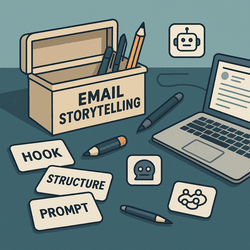
A digital toolkit labeled "Email Storytelling" with tools like prompt cards, pens, and AI icons spread across a desk

This post may contain affiliate links. If you click one and make a purchase, we may earn a commission at no extra cost to you. We only recommend tools we use and trust.

You’ve made it to the end of the Email Storytelling with ChatGPT series—and now it’s time to tie it all together. This wrap-up isn’t just a summary. It’s a powerful toolkit you can use over and over again to write better, more human, more persuasive emails.

Below, you’ll find all the essential prompts from the series, organized by purpose, plus a few new bonus tips to help you create your own storytelling workflow.

🧰 The Core Prompts (Your Storytelling Toolbox)

  • Story Starter Prompt: “Write an email that starts with a short, vivid personal story and connects it to this offer…”
  • Make It Human Prompt: “Rewrite this email to sound more conversational, like it’s coming from a trusted friend.”
  • Emotional Hook Prompt: “Add curiosity, urgency, or emotion to the opening line to hook the reader.”
  • Simplify Prompt: “Rewrite this email to be clear and concise, written at a 6th-grade reading level.”
  • Real-Time Rewrite Prompt: “Rewrite this with more storytelling, energy, and personality—but keep the core message intact.”

These aren’t just tricks. They’re tools. Each one can transform a flat email into something compelling—and most of the time, you can see the difference immediately.

⚙️ How to Use This Toolkit in Your Workflow

  1. Start with your goal. Is it to inform, sell, connect, entertain?
  2. Write your first draft fast. Don’t overthink it.
  3. Run it through your prompts. Use ChatGPT to rewrite, refine, and humanize.
  4. Pick the best version—or blend them. You’re in control. Use what feels right.
  5. Test and tweak. Add CTAs, subject lines, and emotional hooks last.

This approach helps you write faster, improve quality, and maintain your voice—even if you’re not a “natural” storyteller.

💡 Bonus Prompt: The Story Swap

Prompt:
“Replace the opening of this email with a story that better matches the reader’s emotion or current situation.”

Sometimes the story is fine, but the angle is off. This one helps realign your email to meet your reader where they are.

📌 Save It, Use It, Share It

You now have a plug-and-play storytelling system that can work for any email—from onboarding to promotions to weekly newsletters. Keep it bookmarked. Use it often. Share it with your team or VA.

And remember: people ignore boring emails. But they read (and share) stories.

🎯 What’s Next?

This wraps up the email storytelling series… but we’re just getting started. Up next: we’ll dive into SEO and backlinks to help you get traffic to those awesome emails and offers.

Need help crafting a story-driven opt-in funnel? Or want to turn these prompts into a fill-in-the-blank swipe file? Let me know—we can build it together.

A digital toolkit labeled 'Email Storytelling' with tools like prompt cards, pens, and AI icons spread across a desk
Build your best emails with this complete storytelling toolkit powered by ChatGPT.

Image Description: A stylized flat-lay image of a digital writer’s desk, with labeled prompt cards, an open laptop showing an email draft, and icons representing AI tools. The design represents an organized storytelling system for writing compelling marketing emails.
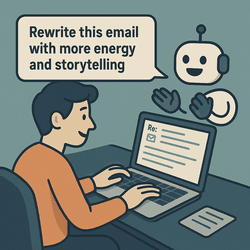
Real-Time Rewrite Prompts: Fix It as You Write It

AI assistant helping a person rewrite email content on a laptop in real time

This post may contain affiliate links. If you click one and make a purchase, we may earn a commission at no extra cost to you. We only recommend tools we use and trust.

Sometimes your email sounds fine—but not great. Something’s off. It doesn’t flow. It doesn’t pop. You’re not alone. That’s where real-time rewrite prompts come in.

Whether you’re writing a welcome email, a sales pitch, or a story-based newsletter, these rewrite prompts for ChatGPT can help you transform good into great—without starting over.

Let’s fix that flat copy right now.

⚡ The Prompt: “Rewrite this with more energy and storytelling”

Prompt:
Rewrite this email with more storytelling, personality, and emotional pull. Make it conversational, human, and slightly humorous. Keep the original purpose.

This is a game-changer. It’s like having a creative editor who gets your voice and turns your first draft into something worth reading.

🔁 The Prompt: “Make this sound like a story from experience”

Prompt:
Rewrite this email to sound like it’s a real story from personal experience. Use first-person language, set the scene, and include emotions and a turning point.

If your email is too pitchy or reads like a product brochure, this one helps you connect with your reader. We’re all wired to respond to stories.

🧠 The Prompt: “Rewrite this with stronger emotional hooks”

Prompt:
Rewrite this email with stronger emotional triggers. Use curiosity, fear of missing out, frustration, relief, or hope to motivate the reader to act.

You don’t need to be manipulative—just human. Tap into real emotions and your emails become irresistible.

✨ Combine Them for Magic

Use one prompt. Then try another. Then mix and match. The goal is to see which version hits hardest while still sounding like you.

You don’t have to choose between polished and personal. You can have both—with a little help from ChatGPT.

Your Turn: Try This

Take one of your past emails. Plug it into ChatGPT with one of the prompts above. Then compare your original to the rewrite. You’ll probably never write the same way again.

And that’s the point. Better stories, better connection, better results.

Coming Up Next…

In the final article of the series, we’ll give you a toolkit of all the prompts we’ve used—and how to stack them into your own storytelling workflow. Bookmark it, print it, tattoo it (kidding… unless?).

AI assistant helping a person rewrite email content on a laptop in real time
ChatGPT makes rewriting your email copy feel like a creative collaboration.

Image Description: A fun and modern illustration showing a human typing an email while a friendly AI robot helps them rewrite it. The scene captures the concept of real-time editing and improvement through storytelling.

The One Prompt That Actually Works

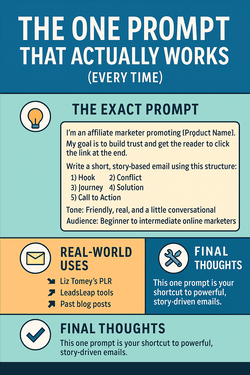
Infographic titled “The One Prompt That Actually Works (Every Time)” showing a powerful ChatGPT email prompt, real-world applications, pro tips, and closing advice.

🎯 The One Prompt That Actually Works (Every Time)

Out of all the prompts and strategies in this series, this is the one I use the most.

It works whether you’re writing from scratch, using PLR, promoting an affiliate link, or following up with subscribers.

It’s simple. Flexible. And it delivers story-based, high-converting email drafts in minutes.


🧠 The Exact Prompt

Here it is — copy, paste, and personalize:


I’m an affiliate marketer promoting [Product Name].  
My goal is to build trust and get the reader to click the link at the end.  
Write a short, story-based email using this structure:  
1) Hook  
2) Conflict  
3) Journey  
4) Solution  
5) Call to Action  
Tone: Friendly, real, and a little conversational  
Audience: Beginner to intermediate online marketers  

That’s it. 9 out of 10 times, this prompt gives you an email that just needs a little polishing — or none at all.


💡 Why It Works So Well

This prompt works because it gives ChatGPT what it needs:

  • Context — who you are, what you’re promoting, and what your goal is
  • Structure — so it doesn’t wander or over-explain
  • Tone + Audience — so it sounds like you (and not a robot)

Most people say “write an email” and get junk. You say this — and you get gold.


📬 Real-World Uses

Try this with:

You’ll build faster, connect deeper, and promote smarter.


🛠️ Pro Tip: Train ChatGPT on Your Voice

If you want to go even further, take 2–3 of your best emails and feed them into ChatGPT with this prompt:


“Analyze these emails and learn my writing style.  
From now on, mimic this voice in future emails.”

That’s when it really starts to feel like you have a ghostwriter in your pocket.


✅ Final Thoughts

This one prompt is worth saving, bookmarking, even pasting above your desk.

It’s your shortcut to powerful, story-driven emails — whether you’re burned out, backed up, or brand new.

👉 Next up: Real-Time Rewrite Prompts

You’ll learn how to close strong, build trust, and sell ethically — all while staying 100% you.


Want step-by-step help building your own online business? Check out my favorite platform below.

ChatGPT Email Prompt Checklist

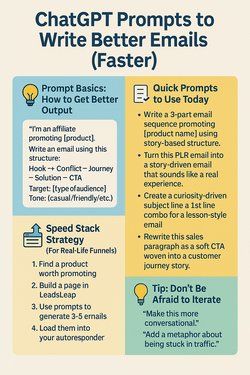
Infographic titled “ChatGPT Prompts to Write Better Emails (Faster)” featuring four sections with icons: Prompt Basics, Quick Prompts, Speed Stack Strategy, and Iteration Tips.

⚡ ChatGPT Prompts to Write Better Emails (Faster)

If you’ve ever said, “I know I should email my list… but I don’t know what to say,” this post is for you.

Let’s turn that hesitation into momentum — with the right ChatGPT prompts.

You’ll learn how to turn vague ideas, PLR content, or basic product knowledge into story-driven, conversion-ready emails… in minutes.


🧠 Prompting Basics: How to Get Better Output

Before we dive into the list, here’s the golden rule:

The more context you give ChatGPT, the better it performs.

Use this format:


“I’m an affiliate promoting [product].  
Write an email using this structure: Hook → Conflict → Journey → Solution → CTA  
Target: [type of audience]  
Tone: [casual/friendly/trustworthy/etc.]”

You’ll be amazed how fast it clicks.


📬 Quick Prompts to Use Today

  • “Write a 3-part email sequence promoting [product name] using story-based structure.”
  • “Turn this PLR email into a story-driven email that sounds like a real experience.”
  • “Create a curiosity-driven subject line + 1st line combo for a lesson-style email.”
  • “Rewrite this sales paragraph as a soft CTA woven into a customer journey story.”
  • “Write a micro-guide email teaching one tip about [topic] with a story intro.”

You can literally paste in your PLR from Liz Tomey’s funnel kits, or your LeadsLeap landing page, and ask ChatGPT to write the emails that match.


🚀 Speed Stack Strategy (For Real-Life Funnels)

Want to launch faster? Use this flow:

  1. 🔗 Find a product worth promoting
  2. 📄 Build a page in LeadsLeap
  3. 📬 Use prompts to generate 3–5 emails
  4. 📥 Load them into your autoresponder

Repeat the process. Every product gets a story. Every story builds trust. Every trusted message gets clicks.


💡 Tip: Don’t Be Afraid to Iterate

If the output isn’t quite “you,” say:

“Make this more conversational.”  
“Add a metaphor about being stuck in traffic.”  
“Make it sound like I’m talking to a friend who just started email marketing.”

AI gives you the draft. You add the edge.


✅ Final Thoughts

You don’t need to be a copywriter. You just need the right input.

With a little structure, a little context, and a few powerful prompts, ChatGPT becomes your personal email assistant — and your funnel-building sidekick.

👉 Next up: The One Prompt That Actually Works


Want step-by-step help building your own online business? Check out my favorite platform below.

Obstacles Holding You Back

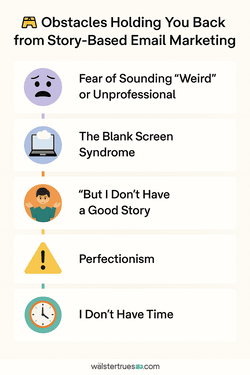
Infographic titled “Obstacles Holding You Back from Story-Based Email Marketing” highlighting five blocks such as fear, blank screen syndrome, perfectionism, and time.

🚧 Obstacles Holding You Back from Story-Based Email Marketing

Storytelling in email marketing works. You’ve seen the structure. You’ve learned the formats.

So why is it still hard to hit “Send”?

Let’s talk about the real blockers — the invisible obstacles that stop you from using story-driven emails to build relationships, trust, and affiliate sales.


😬 1. Fear of Sounding “Weird” or Unprofessional

“What if I tell a story and they think I’m rambling?” “What if it’s too personal?”

Truth: The best emails feel human, not corporate. People buy from people. A good story makes you relatable — not weird.

In fact, being a little weird is how you stand out.


🧠 2. The Blank Screen Syndrome

You sit down to write… and nothing comes out.

Here’s the fix: You don’t have to write a novel. Just tell a quick moment, a lesson, or a mistake.

Still stuck? Use LeadsLeap’s ad tracking to pick a real link you’ve promoted — and tell the story of how you found it.

Better yet, plug a prompt into ChatGPT and let it help you start the draft. (We’ll cover that next.)


🤷 3. “But I Don’t Have a Good Story”

False. Everyone has stories.

  • 📌 Your first failed ad
  • 📌 The day you bought your first PLR pack
  • 📌 A conversation with a subscriber
  • 📌 Even the article you’re reading now

You don’t need an epic. You just need to be real.


⚠️ 4. Perfectionism

Perfection kills progress.

Instead of worrying about the “perfect” email, focus on sending one that’s honest, helpful, and structured.

Use the format we shared in the last article: Hook → Conflict → Journey → Solution → CTA

That’s more than enough to connect and convert.


⏱️ 5. “I Don’t Have Time”

Good news: You don’t need hours. With the right tools, story emails can take 15–20 minutes to create.

Especially when you’re working with:

  • 🧰 PLR packs like Liz Tomey’s funnels
  • 🤖 ChatGPT and the prompts we’ll give you next
  • ✅ A structure that saves brainpower

You don’t need more time. You need a faster system.


🧠 Final Thoughts

There’s nothing wrong with you. You’re not “bad at writing.” You’re not boring. You’re not behind.

You’ve just been missing the process, the prompts, and the pressure-free way to make storytelling part of your routine.

👉 Next up: ChatGPT Prompts to Write Better Emails (Faster)

You’re about to love email writing again — and get better results doing it.


Want step-by-step help building your own online business? Check out my favorite platform below.

5 Story Formats to Use

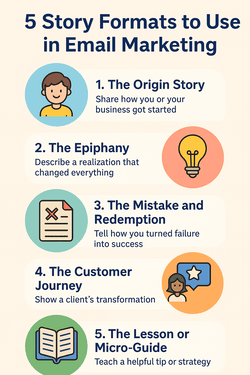
Infographic titled “5 Story Formats to Use in Email Marketing,” visually representing five formats — Origin Story, Epiphany, Mistake & Redemption, Customer Journey, and Micro-Guide — with icons and color-coded sections.

📚 5 Story Formats to Use in Email Marketing

If you’ve got the structure down (Hook → Conflict → Journey → Solution → CTA), the next question is: What kind of stories should you tell?

That’s what this post is about — 5 plug-and-play story formats you can use to fill your emails with trust, relatability, and conversion power.

Whether you’re writing from scratch, using ChatGPT, or repurposing PLR (like Liz Tomey’s funnel kits), these formats make email storytelling fast and effective.


🧒 1. The Origin Story

Everyone loves a “where I came from” story. This format shows your journey, builds credibility, and connects with your reader on a human level.

Use it for: Welcome emails, first-time promos, affiliate intros

Example: “I used to waste hours on dead-end traffic. Then I discovered a smarter way…”


💡 2. The Epiphany

This is the “Aha!” moment that changed everything. Great for introducing a tool, tactic, or belief shift that helped you (or someone else).

Use it for: Product launches, one-off promos, mindset emails

Example: “The moment I realized my list didn’t need to be big — it needed to be loyal…”


❌ 3. The Mistake and Redemption

This format builds trust through vulnerability. Admit a mistake, share the pain, then show how you fixed it (and how they can too).

Use it for: Bridge emails, follow-up sequences, soft sales

Example: “I burned my list with hype. Here’s how I fixed it and what I send now instead…”


🙋 4. The Customer Journey

These stories show what someone else achieved using your product or system. Even if it’s fictionalized (like in PLR), it paints a picture of transformation.

Use it for: Testimonials, case studies, re-engagement sequences

Example: “Jenny started with 0 subscribers. Now she makes $250/week from one funnel…”


📘 5. The Lesson or Micro-Guide

Teach something quick and useful. Wrap it in a story or mini-experience. Great for positioning you as a helpful, non-pushy guide.

Use it for: Nurture emails, email courses, lead magnet follow-ups

Example: “This one subject line got me a 42% open rate — here’s why it worked…”


🛠️ How to Use These Story Formats with ChatGPT

Try prompts like:


“Write an origin story email for a new affiliate using the 5-part structure”  
“Turn this bullet list into a micro-guide email that sells without selling”  
“Rewrite this PLR promo as a ‘redemption story’ style email”  

Then polish it in your voice — or better yet, train ChatGPT to write in your style over time.


✅ Final Thoughts

You now have the structure AND the story formats to power up your email marketing — without starting from scratch every time.

Use these templates with your own experiences, with PLR like Liz Tomey’s prebuilt funnels, or blend both using ChatGPT.

👉 Next up in the series: ChatGPT Prompts to Write Better Emails (Faster)


Want step-by-step help building your own online business? Check out my favorite platform below.

How to Structure an Email Story That Converts

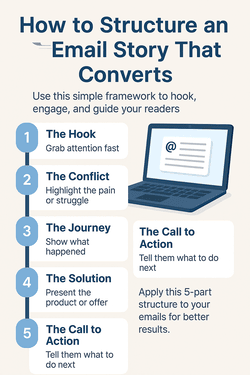
Infographic titled “How to Structure an Email Story That Converts,” outlining five key elements: Hook, Conflict, Journey, Solution, and CTA.

📐 How to Structure an Email Story That Converts

Storytelling works — but only when it’s structured the right way.

Without a clear beginning, middle, and end, your email can fall flat. Or worse… confuse your readers and kill your conversions.

This post gives you a plug-and-play framework to structure any story-driven email — whether you’re writing from scratch or repurposing PLR with ChatGPT.


🧱 The Simple 5-Part Email Story Framework

Use this for promos, broadcasts, onboarding — any time you want attention, engagement, and action.

  1. 1. The Hook (Subject + 1st Line)
    Capture attention fast. Use curiosity, contradiction, or a bold emotional statement.
  2. 2. The Conflict
    What’s the pain, struggle, or obstacle? Make it relatable. It’s the heart of your story.
  3. 3. The Journey
    Show what happened. The mistake you made. The “aha” moment. Keep it conversational.
  4. 4. The Solution
    What helped? Introduce the product, tool, or shift that changed things.
  5. 5. The Call to Action
    Tell them what to do next — with urgency or intrigue. Link it up.

✍️ Quick Example

Subject: I almost quit… until this changed everything

I was ready to throw in the towel. Nothing was working, and I felt like a fraud.

But then I saw what other successful marketers were doing differently. They were telling stories.

Now I use this tool to write story-driven emails fast — and my list is actually opening them. Want to see how it works? 👉 [Link to offer or blog post]

See? Short, punchy, emotional — but still structured.


🤖 Use ChatGPT to Build the Framework

Try a prompt like:


“Write a short email promoting a PLR funnel using this format:
1) Hook
2) Conflict
3) Journey
4) Solution
5) CTA”

Or better yet — plug in Liz Tomey’s PLR funnels and rewrite them using this flow.

You get the speed of done-for-you content… with the connection of a custom-written story.


🔁 Make It Repeatable

Use this structure for:

  • 🧲 Welcome emails
  • 📢 Promotions and product launches
  • 📬 Broadcasts with soft CTAs
  • 📚 Lessons and personal stories

The more you use it, the faster you’ll write. The better your emails perform. The more your list trusts your voice.


📬 Final Thoughts

Structure gives your stories power. And now you’ve got a repeatable format that works for any niche, any audience, and any offer.

👉 Next up: 5 Story Formats to Use in Email Marketing

Until then — tell your story. Structure it right. And watch your readers stick around (and click).


Want step-by-step help building your own online business? Check out my favorite platform below.

Intro to Email Storytelling

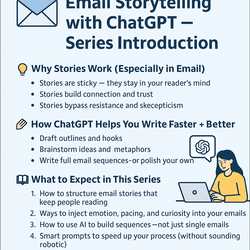
Infographic introducing an email storytelling series using ChatGPT, highlighting benefits like trust-building, faster writing, and AI-powered prompts.

📬 Email Storytelling with ChatGPT — Series Introduction

If you’ve ever stared at a blank screen wondering what to send your email list, you’re not alone.

Writing great emails is tough. But what if you could turn artificial intelligence into your *personal copy assistant*?

That’s exactly what this series is about — using ChatGPT to craft better email stories that build trust, engage your list, and generate more sales.


💡 Why Stories Work (Especially in Email)

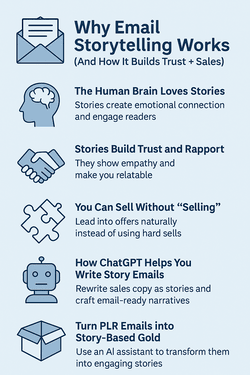
People don’t remember features. They remember feelings. That’s why storytelling works:

  • 📌 Stories are sticky — they stay in your reader’s mind
  • 🤝 Stories build connection and trust
  • 🧠 Stories bypass resistance and skepticism

When you combine a solid story with a great product? That’s how sales happen.


🤖 How ChatGPT Helps You Write Faster + Better

Even if you’re not a natural writer, you can use ChatGPT to:

  • ✍️ Draft outlines and hooks
  • 🧠 Brainstorm ideas and metaphors
  • 📬 Write full email sequences — or polish your own

It’s not about replacing your voice — it’s about amplifying it.


📚 What to Expect in This Series

Over the next several posts, you’ll learn:

  1. ✅ How to structure email stories that keep people reading
  2. ✅ Ways to inject emotion, pacing, and curiosity into your emails
  3. ✅ How to use AI to build sequences — not just single emails
  4. ✅ Smart prompts to speed up your process (without sounding robotic)

We’ll also include example prompts, email templates, and ideas you can use with LeadsLeap or any autoresponder.


📬 Final Thoughts

Storytelling is the secret sauce behind every top-earning email marketer. And now? You’ve got the power of AI to help you do it faster and smarter.

Bookmark this page, subscribe to the blog, and follow along as we drop each post in the series.

👉 Next up: “How to Structure an Email Story That Converts”


Want step-by-step help building your own online business? Check out my favorite platform below.