
How Safelists Work: What Newbies Get Wrong (and How to Fix It)

How safelists work

How safelists work is a question every beginner online marketer eventually stumbles upon. If you’ve been digging for free traffic sources, chances are you’ve seen a mention of them somewhere. But do they actually work? Are they worth your time? And more importantly—how do you use them without wasting your effort?

In this deep dive, you’ll learn exactly how safelists work, who they’re for, and how to use them effectively to build your list, generate traffic, and test offers in your marketing funnel. Whether you’re just starting out or want to scale with low-cost advertising, this guide lays it all out.

What Are Safelists?

Safelists are email-based advertising platforms where members agree to receive promotional messages from other members. In return, they earn the right to send their own messages. It’s a system built on mutual exposure—everyone participates and benefits from the ecosystem.

Unlike solo ads or purchased lists, safelist members have opted in to receive messages. That’s why they’re called “safe” lists—safe from spam complaints and CAN-SPAM violations.

How Safelists Work

At the core, safelists operate on a credit-based or time-based mailing system. Here’s how they work step-by-step:

  1. You sign up and confirm your email.
  2. You agree to receive promotional emails from other members.
  3. You earn credits by reading emails or clicking links.
  4. You use those credits to send your own ads to others.
  5. Optionally, you can upgrade your membership to unlock more features.

There are typically two types of safelists: credit-based and solo mailer style. Most platforms today, like Choice4Profit, offer both options.
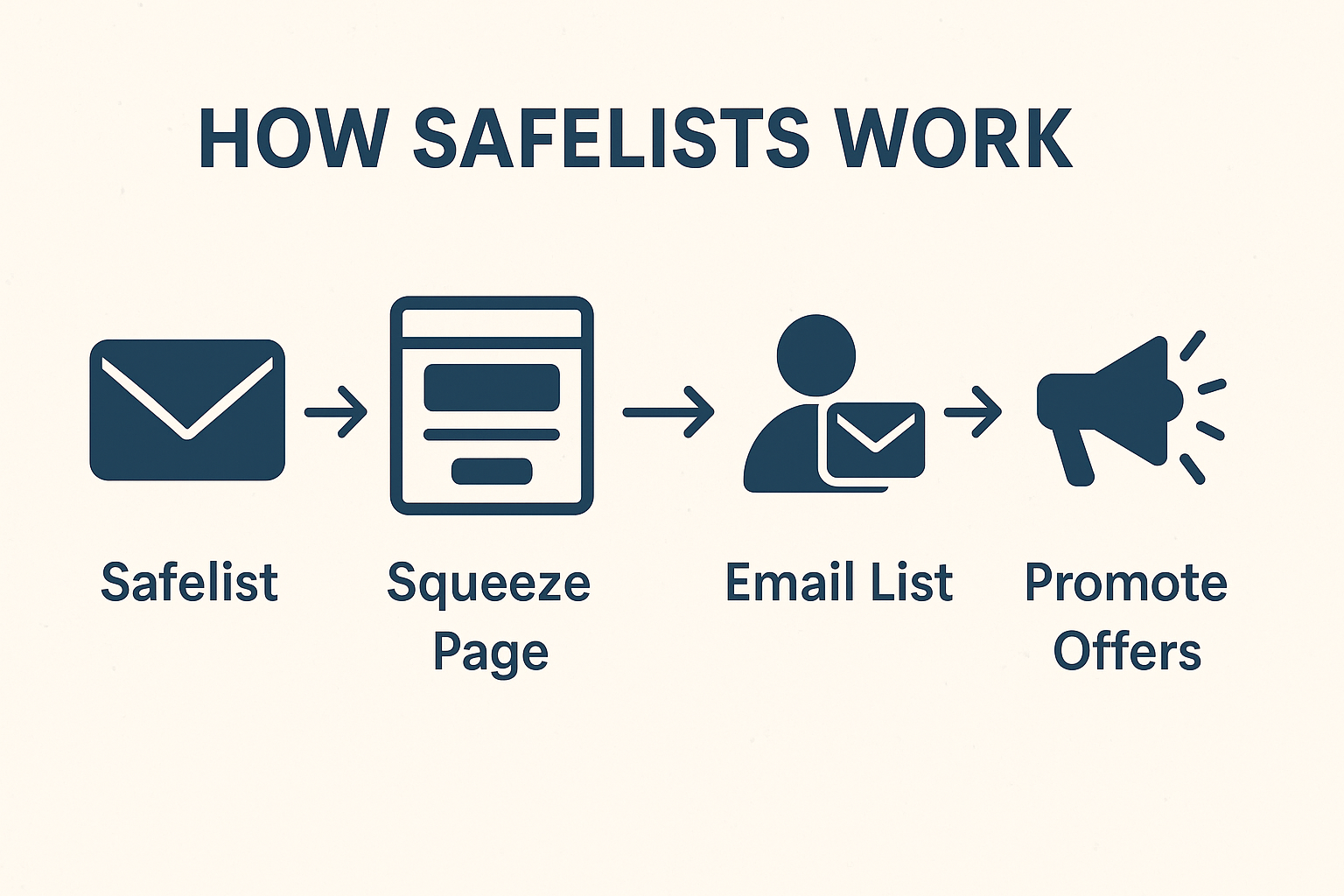
How Safelists Work

Why Do People Use Safelists?

Safelists appeal to marketers for one big reason: free or low-cost traffic. Here’s who typically uses them:

  • Affiliate marketers promoting tools, services, or biz-opps
  • List builders looking to grow their email audience
  • Product creators launching a low-ticket digital offer
  • Traffic resellers running rotators or buying/selling clicks
  • Newbies who need a place to test and learn with no budget

When used correctly, safelists can be a lead generation machine. But—like anything in marketing—there’s a right and wrong way to do it.

Types of Safelists: Credit-Based vs. Solo Mailer

Credit-Based Safelists

These require you to read emails to earn credits. You then use those credits to send your own messages. This is ideal for people who have time but not money.

Solo Mailers

These allow you to send messages to a set number of members on a regular schedule—usually every 3–7 days. Often this feature is reserved for upgraded (paid) members.

Choice4Profit blends both models, giving you flexibility in how you earn and send traffic.

How Safelists Work Best: Strategies That Convert

To get the most out of safelists, you need to stop thinking of them as “spam blasts” and start thinking of them as traffic funnels. Here’s what that looks like:

Use a Squeeze Page

Don’t send traffic directly to an affiliate link. Use a squeeze page to capture email addresses first, then promote offers through follow-up emails.

Offer a Lead Magnet

Give people a reason to sign up—like a checklist, short guide, or mini course. Lead magnets improve conversion rates dramatically.

Mail Consistently

One message won’t cut it. Mail every few days and rotate your subject lines to see what gets the best open rates.

Track Everything

Use a tracking tool like LeadsLeap to monitor clicks, conversions, and opt-ins.

Top Mistakes That Kill Safelist Results

  • Using raw affiliate links (don’t do this!)
  • Writing boring subject lines
  • Sending no follow-up emails
  • Not offering a lead magnet
  • Giving up too soon

We go deeper into these in Top Safelist Marketing Mistakes to Avoid.

Real Stats: How Safelists Work in Practice

Here are real performance ranges you can expect from an optimized safelist campaign:

  • Open Rates: 5% – 25%
  • Click-Through Rates: 2% – 10%
  • Opt-In Rates: 10% – 35% (with a lead magnet)
  • Conversions: 1% – 5% depending on your backend offer

Track and test your way to better results over time.

How Safelists Fit Into Your Bigger Marketing Plan

Safelists are great for:

  • Warming up cold leads
  • Testing new subject lines or headlines
  • Getting low-cost opt-ins
  • Sending backup traffic during launch weeks

For a full comparison of other free traffic tools, read our post on Safelists vs. Traffic Exchanges.

Do Safelists Still Work in 2025?

Yes—if you use them right. Safelists aren’t magic, but they’re far from dead. The key is pairing them with a good funnel, consistent mailing schedule, and tracking tools.

They work best when you treat them like a traffic source for building relationships—not just a place to spam links.

Next Steps: Make Safelists Work for You

Want to get started the smart way?

Now that you understand how safelists work, it’s time to test it out in your own marketing funnel and see what results you can generate.

You now understand how safelists work. It’s time to start using them to grow your business.

What the Heck Is a Safelist (and Why Should You Care)?

Intro to Safelist Marketing – illustrated email inbox with floating icons and text overlay

If you’re looking for a free or low-cost way to start generating traffic online, you’ve probably heard the term safelist marketing. Maybe it sounds like something from the dial-up days — but safelist marketing is alive, well, and still delivering results in 2025.

In this guide, we’ll break down exactly what safelists are, how they work, who should use them, and most importantly — how to avoid the biggest rookie mistakes.

What Is Safelist Marketing?

Safelist marketing is an advertising method where members of a safelist agree to receive promotional emails from one another. You join a safelist, start receiving ads from other members, and in exchange, you earn the ability to send your own messages to the community.

This model means all recipients have opted in to receive marketing — making it “permission-based” advertising. Most safelists operate on a credit-based system, where you earn credits by reading emails or clicking links. You then redeem those credits to send your own ads.

Why Safelists Still Work in 2025

In a world dominated by social media algorithms and expensive pay-per-click ads, safelist marketing offers something unique: predictable traffic you can control.

  • Low-cost or free: Most safelists offer free membership with optional upgrades
  • Daily ad opportunities: You can promote every day if you want
  • Guaranteed exposure: Many safelists reward members for opening and clicking ads
  • Perfect for beginners: No fancy funnels or ad spend required to get started

That’s why safelist marketing continues to attract new and experienced marketers alike. They’re not meant to replace paid ads — but they’re a great testing ground and lead source, especially when you’re just starting out.

How Safelist Credit Systems Work

Most safelists use a credit-based model to keep things fair and prevent spam. Here’s how it works:

  1. You join a safelist and start receiving emails from other members
  2. You earn credits by opening those emails, clicking links, or completing tasks
  3. You spend your credits to send your own emails or display ads
  4. You can also buy credits or upgrade to send more ads, more often

Pro tip: Don’t just ignore those emails — even if they don’t interest you, clicking earns you credits to power your own promotions.

What Can You Promote on Safelists?

Safelist marketing is best for:

  • Lead capture pages (squeeze pages)
  • Low-ticket affiliate offers
  • Free tools or giveaways (lead magnets)
  • Traffic exchanges, safelists, or other biz opp programs

High-ticket items? Not so much. Safelist audiences are often looking for fast, free, or low-cost opportunities. Use them to build a list, warm up your leads, and promote bigger offers down the line.

Do NOT Use Raw Affiliate Links

This is one of the biggest rookie mistakes in safelist marketing. If you’re just pasting in an affiliate link — no squeeze page, no funnel — you’re wasting traffic and missing out on long-term results.

Instead, build a simple funnel:

  1. Create a squeeze page with a free offer (PDF, checklist, training video)
  2. Hook it up to an autoresponder
  3. Drive safelist marketing traffic to the squeeze page, not the offer
  4. Follow up via email with your affiliate links

This way, you’re building your own email list — and you can promote more than once.

Need a Tool to Build That Funnel?

If you’re new and want a simple way to create landing pages and email sequences, try LeadsLeap. It’s free to start and has everything you need to build your first list and autoresponder funnel.

Types of Safelist Ads You Can Use

Safelist marketing usually supports several ad formats:

  • Solo Ads: Full-email messages sent directly to members
  • Text Ads: Short clickable blurbs shown in rotation
  • Banner Ads: Visual ads displayed in the member area
  • Login Ads: Ads shown when members log in (high visibility)

Each format serves a purpose — solo ads are best for long-form pitches or funnel links, while banners and text ads are great for brand exposure and testing hooks.

Tips to Maximize Your Results

  • Write curiosity-driven subject lines to improve open rates
  • Keep solo ads short and clear — use bullet points or bold text
  • Use tracking links to measure what’s working (LeadsLeap has this)
  • Rotate offers and test different capture pages

Safelist marketing is like the gym — consistency beats brute force. Show up daily, rotate your ads, and optimize based on what works.

Where Do You Start?

You’ll want to start with 2–3 safelists and get into a rhythm. Read the emails. Click for credits. Send your solo ads. Track what happens.

One great option is Choice4Profit, a newer safelist platform that already has over 90 active members and weekly commission payouts. It’s free to join and beginner-friendly. You’ll see more about it in future posts.

Check out our guide on safelist subject line formulas to help improve your open rates from the start. Also, see how to track safelist ads to know what’s actually working.

Coming Up Next…

We’ll dig deeper into:

  • How to write high-converting safelist emails
  • The best safelists to join (with reviews)
  • How to create a lead magnet for safelist funnels

If you’re serious about learning low-cost traffic strategies, the safelist marketing world is a great training ground.

Final Thoughts

Safelist marketing isn’t magic — but it works. Especially when you focus on building a list instead of chasing quick affiliate clicks. If you’re just getting started and want a real-world, hands-on way to test, build, and grow — this is it.

Use safelist marketing to learn the fundamentals. Then scale up with everything else.

This Is How I Get Backlinks to Every Blog Post

Cartoon llama with glasses holding a backlink checklist on a clipboard

The Ultimate Backlinking Checklist for Bloggers

Affiliate Disclaimer: This post may contain affiliate links. If you click one and make a purchase, we may earn a small commission at no extra cost to you. We only recommend tools we personally use and trust.

Why a Checklist Matters

Even seasoned marketers forget the small stuff. That’s why I created this no-fluff checklist to follow every time I publish a blog post. These steps will help you build natural backlinks that drive traffic and grow authority.

🔥 The Backlink Booster Checklist

  • ✅ Add keyword-rich internal links to at least 2 other blog posts
  • ✅ Link out to 1–2 trusted authority sites in your niche
  • ✅ Share the post in 1–2 niche communities or forums
  • ✅ Drop a helpful reply on Quora, Reddit, or Facebook Groups with a link if relevant
  • ✅ Embed a related video, image, or downloadable resource
  • ✅ Use natural, descriptive anchor text (no “click here” nonsense)
  • ✅ Turn the post into a short YouTube, TikTok, or carousel for added reach
  • ✅ Include your post in your email newsletter or signature
  • ✅ Submit it to a blog directory or content aggregator
  • ✅ Ask one friend or colleague to share it if it’s helpful

Bonus Moves for Link Growth

Want to go beyond the basics?

  • 🎯 Add it to your “Start Here” or “Resources” page
  • 🎙 Mention it when guesting on podcasts or doing interviews
  • 🧠 Pitch it to newsletters in your niche
  • 📄 Create a downloadable checklist or mini-guide that links back to the full post

Backlinks Are Built, Not Bought

If you rinse and repeat this list, you’ll build more than backlinks—you’ll build momentum. SEO doesn’t have to be complicated when you’ve got a process.

That’s a Wrap

This closes out our backlink series. Thanks for sticking with it. From AI-powered content to smarter traffic strategies, we’ve got more coming your way.

CLOSE


Want step-by-step help building your own online business? Check out my favorite platform below.

How I Use Forums to Build Backlinks That Stick

Llama giving backlink tips on a forum thread

Using Forums and Communities for Backlinks

Affiliate Disclaimer: This post may contain affiliate links. If you click one and make a purchase, we may earn a small commission at no extra cost to you. We only recommend tools we personally use and trust.

Why Forums Still Matter

Despite being around since the dawn of the internet, forums and online communities are still alive—and more importantly—still indexed by Google. If you’re looking to build contextual backlinks while participating in real conversations, forums remain a goldmine.

Where to Start

Begin with niche-relevant forums like Warrior Forum, BlackHatWorld, or industry-specific message boards. Also consider Q&A platforms like Quora and Reddit (in moderation) for non-spammy link drops in the right threads.

Search Tip:

Use this Google search string to find forums: "your niche" + inurl:forum

How to Drop Links Without Getting Banned

  • Fill out your profile completely—most forums allow a signature link.
  • Engage first. Answer questions. Offer real value.
  • Only drop a link when it’s helpful and answers a question.
  • Avoid duplicate content—write fresh takes or link to your original posts.

Signature Links Still Work

Signature backlinks may be NoFollow, but they still generate traffic and can lead to natural DoFollow mentions over time. Just stay active and contribute consistently.

Don’t Ignore Private Communities

Slack groups, Discord servers, and even Facebook groups often allow pinned resources or promotion days. These aren’t traditional backlinks, but they can spark traffic and future link exchanges.

Final Thoughts

Forums are all about playing the long game. You won’t see results overnight, but if you become known as a helpful voice in your niche, your backlinks—and your reputation—will follow.

Up Next:

We’ll finish out our backlink series with a roundup of the best practices and a checklist you can use on every blog post to earn more links and traffic.

CLOSE


Want step-by-step help building your own online business? Check out my favorite platform below.

Which Social Platform Brings the Most Free Traffic in 2025?

Which social platform brings the most free traffic in 2025 – digital blog graphic with icons of TikTok, YouTube, and Instagram

If you’re looking to drive free traffic to your website, offers, or content in 2025, the battlefield has shifted—but the opportunities are still massive. The winner? TikTok still leads the pack.

But depending on your niche and comfort level, other platforms like YouTube Shorts and Instagram Reels also offer strong potential—if you play to their strengths.

1. TikTok: The Viral Traffic King (Still)

TikTok continues to dominate when it comes to fast, free reach. Why? Because it doesn’t require a huge following to go viral. The platform’s algorithm rewards:

  • ✅ Short, engaging videos (10–60 seconds)
  • ✅ Consistency (daily or weekly posting)
  • ✅ Problem-solving, tips, humor, or storytelling

It’s not about polish—it’s about relatability. If you’re willing to show up, test content styles, and use trending sounds or hashtags, you can grow an audience from scratch—and send that traffic straight to your blog, lead magnet, or opt-in page.

2. YouTube Shorts: Viral + Evergreen

YouTube Shorts might not move as fast as TikTok, but it offers a major benefit: your videos stick around.

Unlike TikTok, where content fades in 48 hours, a good YouTube Short can continue driving views and traffic weeks—or even months—later.

Best part? If you’re already creating blog content, you can easily repurpose tips into short videos and send people right back to your site.

3. Instagram Reels: Strong, But Tougher for Newbies

If your niche is visual (think fitness, fashion, design, or travel), Reels can work well. But here’s the thing: Instagram favors established accounts.

New creators can still get traction, but it often takes more effort and time to break through. If you’re already on Instagram, Reels are a great tool. But if you’re starting fresh, TikTok or YouTube Shorts might give you faster wins.

Where Should You Start?

Ask yourself these questions:

  • 🎤 Are you comfortable talking on camera? → Try TikTok or YouTube Shorts
  • 🎨 Do you love visual design or lifestyle content? → Lean into Instagram Reels
  • 📈 Do you want videos that last longer and can rank in search? → Go with YouTube Shorts

Pro Tip: Pick ONE platform to focus on first. Then repurpose your best videos across the others using tools like CapCut, InShot, or Canva.

What About X (Twitter), Facebook, or Pinterest?

These platforms still offer free traffic, especially if you’re using groups, threads, or carousels—but they generally have a slower ramp-up than video-first platforms.

That said, they’re great for repurposing and building authority over time. You can absolutely include them in your strategy—just don’t start by trying to master them all at once.

Final Thoughts

In 2025, TikTok is still the fastest platform for free exposure, followed closely by YouTube Shorts for long-term discoverability. Instagram Reels holds value, especially if you’re already building a brand there.

Pick the platform that fits your style, create simple videos that offer real value, and repurpose smartly. Free traffic is still very real—you just have to meet the platforms where they are.

Want more practical traffic tips like this? Explore the full 104 Free Advertising Questions series at ForgedSite.com.

Want step-by-step help building your own online business? Check out my favorite platform below.

Does Domain Age Affect My SEO Traffic?

Does domain age affect SEO traffic – flat digital graphic with web browser and clock

You may have heard that older domains rank better in Google. But is it true? And if you’re just starting with a brand-new site, should you be worried?

The short answer is: domain age can play a small role in SEO—but it’s not nearly as important as content quality, consistency, and site structure.

Why Older Domains Sometimes Rank Faster

Older domains often have an advantage simply because they’ve been around longer. That means:

  • ✅ Google has already crawled and indexed them
  • ✅ They may have built backlinks over time
  • ✅ They’ve established a track record of trust and relevance

But here’s the catch—that only matters if the content on those older domains is helpful and up to date. An abandoned site from 2010 with zero updates won’t outrank your well-maintained, informative blog just because it’s older.

What If My Domain Is Brand New?

Don’t panic. Google doesn’t punish new domains. But it does take time to build trust. That’s why new sites usually need a few months before seeing strong SEO results.

Here’s how you can speed that up:

  • Publish helpful content consistently – This trains Google to crawl your site regularly
  • Use smart internal linking – Show how your posts relate to each other
  • Submit your sitemap in Google Search Console – Helps new content get indexed faster
  • Keep your site clean and fast – Google loves sites that load quickly and are mobile-friendly

New Domains Can Beat Older Ones

Plenty of newer websites outperform older ones by focusing on value. You can absolutely outrank an “aged” site if:

  • You target better keywords
  • You answer questions more clearly
  • You update content regularly
  • You provide real value—not fluff

Effort beats age. Every time.

What Google Really Cares About

Google looks at hundreds of ranking factors. Domain age is just one small piece. Here’s what carries more weight:

  • Content quality and relevance
  • Backlink profile (earned naturally)
  • Keyword optimization
  • User engagement (time on page, bounce rate)
  • Mobile usability and page speed

If you focus on these things, your new domain will build authority over time. The age will come—what matters is what you’re doing with it.

Final Thoughts

Yes, older domains can rank faster—but that’s just momentum. You can build your own momentum with smart SEO and consistent value.

Focus on publishing quality posts, optimizing your content, and building trust with both users and Google. The results will come—whether your domain is 10 years old or 10 days old.

Want more no-nonsense traffic tips? Check out the full 104 Free Advertising Questions series at ForgedSite.com.

Want step-by-step help building your own online business? Check out my favorite platform below.

What’s the Fastest Way to Get Indexed on Google?

What’s the fastest way to get indexed on Google – flat digital graphic

If you’re struggling to get your blog posts or website pages found by search engines, you’re not alone. Fortunately, there are several proven techniques you can use to speed up the process. In this post, we’ll explore the fastest way to get indexed on Google, including five effective strategies that actually work — plus bonus tips, common pitfalls, and tools that make the process easier.

Why Indexing Matters More Than You Think

Before your site can rank in Google’s search results, it must first be indexed. Think of indexing as getting added to Google’s digital library. If your content isn’t in the library, it doesn’t matter how valuable it is — nobody will find it.

This makes indexing your first and most important SEO milestone. Without it, your content won’t get organic traffic, backlinks, or search visibility. If you’re serious about generating consistent web traffic, then understanding the fastest way to get indexed on Google is mission-critical.

How Google Indexes Your Site

Google uses bots, also known as “crawlers,” to discover and scan websites across the internet. These bots follow links, analyze content, and determine whether the page should be indexed.

The more signals you send to those crawlers — and the easier you make it for them to access your content — the faster you’ll be indexed. The fastest way to get indexed on Google always involves making your content easy to crawl and understand.

1. Submit URLs Manually via Google Search Console

One of the quickest and most direct methods is submitting your new post manually through Google Search Console.

If you haven’t set it up yet:

  • Go to Google Search Console
  • Add your site and verify domain ownership
  • Use the URL Inspection Tool
  • Paste your full page URL and click “Request Indexing”

This method usually results in your page being crawled within hours (sometimes minutes), making it the fastest way to get indexed on Google for brand-new content.

Best Practices for Manual Submission

  • Make sure your page has real content, not just placeholders
  • Use canonical tags if duplicate content is present
  • Fix any crawl or mobile usability errors first

2. Create Keyword-Rich, High-Quality Content

Content that’s thin, duplicated, or too generic may get ignored by Google — even if it’s submitted. The best way to ensure indexing is to publish content that Google wants in its search results.

Here’s how to do it:

  • Write long-form content that answers real user questions
  • Include the focus keyword — fastest way to get indexed on Google — in your title, meta description, and at least 1% of your body text
  • Use bullet points, short paragraphs, and clear headings (H2, H3)

For example, you’re reading an article right now optimized for “fastest way to get indexed on Google.” The content is long, useful, and clearly structured — exactly what Google looks for.

3. Interlink from Existing Indexed Pages

Internal links are like arrows telling Google where to go next. If you have older posts that are already indexed, add a link from them to your new content. This helps Google’s bots find your page faster.

Internal Linking Tips:

  • Use relevant anchor text (e.g., “check out this guide on the fastest way to get indexed on Google”)
  • Link from your homepage or top-performing posts
  • Make sure the links are dofollow and not buried in footer or sidebar widgets

Need an example? We do this on our guide to tracking safelist ads — it helps spread SEO value across the site.

4. Promote Your Content on Social Media

While social media doesn’t directly influence rankings, it plays a key role in discovery. Google crawls platforms like LinkedIn, X (Twitter), and Facebook regularly. Posting your content with a clean link can create entry points for indexing.

Platforms to consider:

  • X (Twitter): Great for fast indexing
  • LinkedIn: Especially effective for B2B topics
  • Reddit or Quora: Only if you can share in a helpful, non-spammy way

5. Submit an XML Sitemap

Your XML sitemap is a blueprint that shows Google all of the pages you want indexed. WordPress users can auto-generate one using Rank Math, Yoast, or All in One SEO Pack.

Once you have your sitemap URL:

  • Go to Google Search Console
  • Click “Sitemaps”
  • Paste in the URL (e.g., yourdomain.com/sitemap_index.xml)

Pro tip: Update your sitemap regularly or use a plugin that does it for you automatically.

Bonus Tip: Try Instant Indexing Plugins

If you’re running WordPress, tools like the Rank Math Instant Indexing plugin allow you to connect directly to Google’s API and trigger indexing requests automatically every time you publish or update a post.

More Ways to Accelerate Google Indexing

  • Use Ping services: Sites like Ping-o-Matic notify search engines when your content updates
  • Create short-form videos (YouTube Shorts): Add your blog link in the description
  • Comment on relevant blogs or forums: Include your post link if allowed
  • Use Web 2.0 backlinks: Sites like Medium or Blogger can link to your content

Common Indexing Pitfalls to Avoid

  • Using “noindex” tags accidentally: Check your meta settings and plugin defaults
  • Broken or duplicate content: Pages with very little content or copied text may not be indexed
  • Blocked robots.txt: Make sure you’re not blocking Google’s bots
  • Slow-loading or mobile-unfriendly pages: Poor UX can delay indexing or affect rankings

How Long Does Indexing Usually Take?

  • Manual submission: 1 hour to 48 hours
  • Sitemaps and interlinks: 1–3 days
  • Natural crawling (no signals): 1–4 weeks

Final Thoughts: Be Proactive

If your post isn’t indexed within a week after taking these steps, something may be blocking it. Check for crawl errors, fix broken links, and validate mobile usability. But more often than not, you just need to be more proactive. The fastest way to get indexed on Google is to control the process instead of waiting around for bots to find you.

Want More Indexed Content and Consistent Traffic?

Indexing is only the beginning. If you want real traffic, rankings, and results, you need a long-term strategy. Start with content like this post, then level up by learning how to build a real business around it.

Wealthy Affiliate is a platform that helps you build, grow, and rank websites from the ground up. It’s what we recommend if you’re serious about succeeding online.

How Many Blog Posts Do I Need Before SEO Kicks In?

How many blog posts do I need before SEO kicks in – flat-style digital illustration

This is one of the most common questions I get from new bloggers and affiliate marketers: “How many posts do I need before I start getting traffic?”

While there’s no exact number, most sites begin to see some consistent organic traffic after publishing around 20 to 30 quality blog posts. But there’s a big catch—it’s not just about the number. It’s about the value behind each post.

Quality Over Quantity (Every Time)

Don’t just write to hit a number. Publishing 30 low-quality posts stuffed with keywords won’t do you any favors with Google. What search engines—and readers—are looking for is:

  • ✅ Helpful, original answers
  • ✅ Clear formatting and structure
  • ✅ Targeted long-tail keywords
  • ✅ Content that solves problems or answers real questions

That’s what builds SEO momentum—not just a post count.

Each Post Is a Traffic Door

Think of each blog post as a doorway into your website. The more doors you have, the more chances people have to walk in. But if those doors lead nowhere—or worse, if they slam shut (thin content, poor structure)—Google won’t recommend them.

With 30 well-targeted, well-written blog posts, your site can start to gain traction. But it’s not unusual for that to take 3 to 6 months depending on your niche, keyword difficulty, and consistency.

Consistency Is the Secret Weapon

Instead of sprinting to publish 30 posts in 30 days, aim for a schedule you can stick with. If you write one high-quality blog post per week, you’ll hit 26 in six months—and build trust with both readers and Google.

Search engines reward consistent updates. That doesn’t mean daily blogging. It means showing up regularly with content that helps your audience.

What About Indexing and Ranking?

Just because you publish doesn’t mean you’ll rank overnight. Here’s a typical timeline:

  • 🗓️ Week 1–4: Google crawls and indexes your post
  • 🕵️‍♂️ Week 4–8: You might appear in low positions for your keywords
  • 📈 Month 3–6: Rankings improve, clicks start to come in

SEO is a long game. Don’t expect instant results. But if you focus on quality content and keep publishing consistently, your traffic will grow steadily over time.

My Favorite SEO Boost Tools

If you’re trying to reach your first 20–30 high-performing blog posts, these tools can help:

Final Thoughts

You don’t need 100 posts to start seeing SEO results. But you do need enough quality content to show Google you’re worth ranking. If you commit to creating helpful, well-structured posts on a regular basis, you’ll build SEO momentum naturally.

Want help building your own content strategy? Check out more answers inside the full 104 Free Advertising Questions series at ForgedSite.com.

Want step-by-step help building your own online business? Check out my favorite platform below.

Can AI Help With SEO Content Creation?

Can AI help with SEO content creation – flat-style digital illustration of person working at laptop with AI and SEO icons

Short answer? Yes—AI can absolutely help you create SEO content. But before you throw out your keyboard and let a robot take over your blog, let’s set the record straight on what AI can and can’t do for your content strategy.

What AI Is Good At

AI tools like Copy.ai and ChatGPT are powerful assistants for content creators. They can:

  • 💡 Generate blog post ideas
  • 📝 Draft outlines and article frameworks
  • 🔍 Suggest keyword variations
  • ⏱️ Speed up the writing process

For busy solopreneurs and affiliate marketers, AI is a time-saving tool that helps you stay consistent and organized.

Where AI Falls Short

AI still struggles with:

  • ❌ Writing with personality
  • ❌ Understanding niche context
  • ❌ Avoiding outdated or incorrect info
  • ❌ Creating deep insights or original takes

While AI can churn out a rough draft in seconds, that draft often sounds robotic or generic. And let’s be honest—Google doesn’t reward cookie-cutter content. It’s looking for original, helpful, human content.

How to Use AI Without Losing Your Voice

Here’s how I recommend using AI in your SEO content creation process:

  1. Start with AI for brainstorming: Let it generate outlines or blog structures
  2. Use it to speed up repetitive tasks: meta descriptions, bullet points, etc.
  3. Rewrite and personalize everything: Inject your tone, your examples, your value
  4. Check accuracy: AI sometimes “hallucinates” info—always fact-check it

AI is your assistant—not your replacement. You still need to bring the human touch that readers and search engines reward.

Can AI Content Rank in Google?

Yes—but only if it’s been edited and optimized by a real person. Google’s helpful content guidelines specifically say content must be written for people, not just for search engines.

So if you’re using AI to speed up your content workflow—great. Just make sure to polish and personalize it before hitting publish.

Tools Worth Trying

  • ChatGPT – Great for ideas, outlines, and early drafts
  • Copy.ai – Good for email copy, product descriptions, and short-form content
  • Jaaxy – My go-to keyword tool that pairs perfectly with AI-generated ideas

Final Thoughts

AI isn’t replacing good writers—it’s supporting them. Think of AI as your creative intern: it works fast, needs supervision, and occasionally needs a redo. But when used right, it can boost your SEO strategy, save hours of time, and help you publish more consistently.

Want more no-fluff strategies for getting free traffic? Check out the full 104 Free Advertising Questions series at ForgedSite.com.

Want step-by-step help building your own online business? Check out my favorite platform below.

What’s the Difference Between On-Page and Off-Page SEO?

What’s the difference between on-page and off-page SEO – digital blog illustration

If you want to rank in Google and get free traffic, you need to understand both sides of the SEO equation: on-page SEO and off-page SEO.

The easiest way to think about it? On-page SEO is what you say about yourself. Off-page SEO is what others say about you.

What Is On-Page SEO?

On-page SEO refers to everything you control on your own website to help search engines understand and rank your content. It’s the technical and content-side of your pages that makes things “click” with Google.

Key elements of on-page SEO include:

  • Keywords: Placing your target keyword in the title, URL, and headers
  • Content Structure: Using headings (H2, H3), bullet points, and logical flow
  • Internal Linking: Linking to related blog posts or pages on your own site
  • Image Optimization: Adding alt text, compressed images, and proper filenames
  • Meta Descriptions & Titles: These tell Google what your page is about in search results

Basically, on-page SEO helps Google understand what your page is about—and how relevant it is to what people are searching for.

What Is Off-Page SEO?

Off-page SEO refers to anything that happens outside your website that impacts your rankings. The biggest piece of this is backlinks—links from other websites pointing to your content.

Why do backlinks matter? Because they’re like trust signals. When a site links to you, it’s basically saying, “Hey, this content is worth checking out.” The more quality backlinks you have, the more authority your site builds with search engines.

Other forms of off-page SEO include:

  • Brand mentions on social media or other websites
  • Guest posting on other blogs
  • Answering questions in forums like Quora or Reddit

You Need Both

On-page SEO gets your content properly structured. Off-page SEO helps prove to Google that your site deserves to rank.

You won’t succeed with just one. A beautifully optimized post won’t rank if nobody links to it. But you also won’t get backlinks if your content is a mess.

Start With On-Page, Then Build Out

If you’re new to SEO, start by getting your on-page setup right:

  • Pick long-tail keywords
  • Use headers and short paragraphs
  • Add internal links to related posts
  • Optimize your images and add alt text

Once your content is in good shape, start working on your off-page strategy:

  • Write helpful guest posts and include links back to your site
  • Answer questions in forums or Facebook groups with links to your blog
  • Create shareable content like checklists or tools others might link to

Final Thoughts

Think of SEO like building a reputation. Your on-page SEO is your message. Your off-page SEO is your credibility.

When you get both working together, search engines take notice—and free traffic follows.

Want more no-fluff answers to common traffic questions? Check out the full 104 Free Advertising Questions series over at ForgedSite.com.

Want step-by-step help building your own online business? Check out my favorite platform below.